Browser-first
No installs. Runs in your browser.
Every Markdown tool you need, in one place. Convert PDF, Word, HTML, Notion to and from Markdown, plus a live editor. Core browser tools are free without signup; Pro and Team add AI/OCR credits, higher limits, and content workflows.
No installs. Runs in your browser.
Transparent and community-driven.
Your files stay on your device.
You control what gets processed.
Power your AI, docs, and content pipelines.
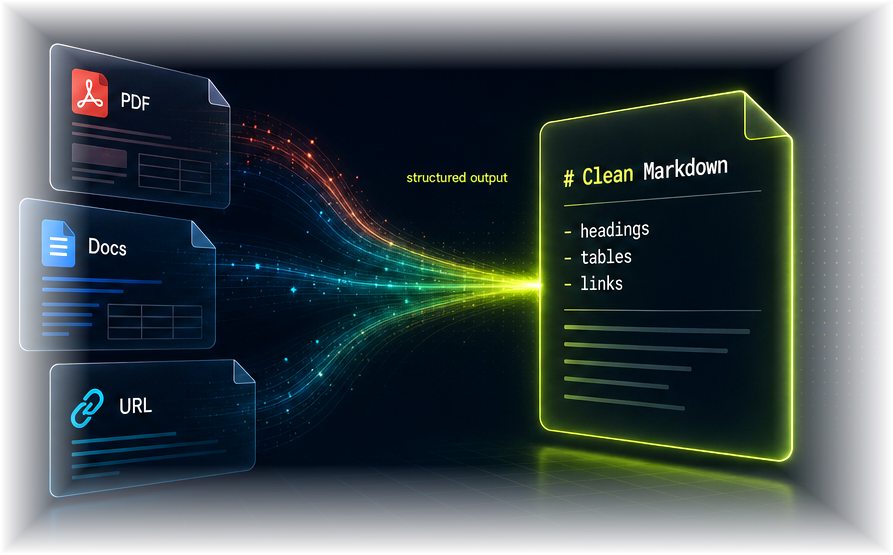
Upload PDFs, docs, HTML, or paste a URL. We'll handle the rest.
Smart parsing, OCR opt-in, and structure-aware conversion.
Export clean Markdown for LLMs, RAG, Obsidian, or publishing.
Start from a file, a link, a table, or an existing Markdown document.
Convert native PDF files to clean, editable Markdown.
Open, edit, and preview Markdown in your browser.
Preview Markdown and save it as PDF from your browser.
Convert pasted HTML or .html files into editable Markdown.
Render Markdown as copyable HTML.
Convert Word documents to clean Markdown.
Convert Markdown to editable Word documents.
Paste a web page, get Markdown.
Export a Notion page as editable Markdown.
Create a Notion page from Markdown.
Convert public Google Docs to clean Markdown.
Convert Markdown to formatted Google Docs content.
Convert CSV data to Markdown tables.
Extract Markdown tables as CSV.
Convert JSON into readable Markdown tables.
Convert Excel workbooks to Markdown tables.
Convert Markdown tables to editable Excel files.
Paste a table and generate clean Markdown.
Render Markdown as PNG or JPG.
Convert ebooks to Markdown.
Build ebooks from Markdown.
Convert academic LaTeX to Markdown.
Convert Markdown into LaTeX.
Convert RTF files and raw RTF text to Markdown.
Convert Markdown to Confluence-ready rich text.
Convert Markdown to Slack mrkdwn.
Export ChatGPT chats as Markdown.
Turn screenshots and images into Markdown.
Convert YouTube transcripts into Markdown.
Convert WeChat articles to Markdown.
Convert Bilibili captions to Markdown.
Convert public posts to Markdown.
Convert podcast episodes and feeds to Markdown.
Convert public TikTok links to Markdown.
Convert public Xiaohongshu notes to Markdown.
Convert Reddit posts and comments to Markdown.
Convert public LinkedIn posts to Markdown.
Whether you're feeding an AI, building docs, or migrating notes — 2markdown has the right tool.
Convert PDFs, websites, Word documents, and Notion pages into clean Markdown your vector database can actually parse. Skip the OCR cleanup. Skip the formatting mess. Get text that chunks well and embeds cleanly into your retrieval pipeline.
Markdown is the native format LLMs prefer. Convert your reference materials to Markdown first, paste them into Claude or ChatGPT, and watch your prompts get more token-efficient with better structure preservation. Or use the live Markdown viewer to preview your prompts before sending.
Move old documentation, research notes, or imported PDFs into Markdown-native tools. 2markdown handles the conversion so you can focus on organizing, linking, and thinking. Preview the output in our live Markdown viewer before importing.
Write in Markdown, export to PDF for clients, HTML for the web, DOCX for collaborators, slides for presentations. One source of truth, every output format covered — plus a live Markdown previewer to check your formatting before you publish.
Core tools run locally whenever the format allows it, with explicit consent before AI or third-party processing.
Use core browser-based tools without an account. Pro and Team plans add AI/OCR credits, higher usage limits, and content workflows.
Clean Markdown is easier to review, chunk, index, paste into prompts, and move into docs systems.
Converters, table tools, and a live Markdown editor share one consistent interface.
2markdown is an online Markdown converter with 37 tools to convert files, links, platform content, and Markdown — plus a live Markdown viewer to read, format, and render Markdown in your browser. Core browser tools are free to use without signup, while Pro and Team plans add AI/OCR credits, higher limits, and content workflows.
Basic access and core browser-side Markdown tools are free to use without signup. Paid Pro and Team plans are for heavier workflows: more AI/OCR credits, higher content-link limits, ad-free usage, team seats, and support.
Yes — our live Markdown Viewer lets you read, edit, preview, format, and render Markdown directly in your browser. It supports GitHub Flavored Markdown, LaTeX math, syntax highlighting, and one-click export to PDF, HTML, or .md. No signup, no extensions required. It's the online Markdown previewer your workflow has been missing.
No. Core conversions run entirely in your browser — your files never leave your device. For AI-mode conversions (used for scanned PDFs and complex formats), we ask for explicit consent before processing, and your data is not retained after the conversion completes. Privacy-first, always.
Pandoc is a powerful command-line tool that requires installation and technical knowledge. 2markdown is a free browser-based Markdown converter and viewer that works instantly without setup. For one-off conversions, document previewing, or non-technical users, 2markdown is faster and simpler. For batch automation in CI pipelines, Pandoc still wins.
Yes — that's what we built it for. Clean Markdown is the preferred format for vector embedding, prompt context, and LLM fine-tuning. Convert your source documents (PDFs, web pages, Word docs, Notion exports) into Markdown with 2markdown, preview them in our Markdown viewer to verify the formatting, then feed them into your RAG pipeline or paste them directly into Claude or ChatGPT.
We support standard CommonMark and GitHub Flavored Markdown (GFM) as defaults across all tools. Specific tools support additional extensions — LaTeX math via KaTeX, footnotes, task lists, and tables. The Markdown Viewer renders these in real time so you can verify formatting before exporting.
Yes. Every conversion result can be opened in our live Markdown Viewer to preview, format, and refine before download. You can also paste any Markdown directly into the Viewer to read it as a rendered document with syntax highlighting, math equations, and diagrams — useful when reviewing a .md file, prepping a prompt, or polishing documentation.